Apex Pacific Pty Ltd.  
Home
home
Contact Us
contact us
Phone Number

Frequently Asked Questions - Dynamic Mail Communicator™

Q:Is it possible to send the emails directly from my database mailing list(such as Access, SQL server) since my mailing list are not in Text or CSV format
A:

Yes, MailCommunicator allows you to send emails from your database file directly.

You simply select the database file and the table you want to use through the program interface then the program will send from the database automatically.

To do that, please follow the instruction below:

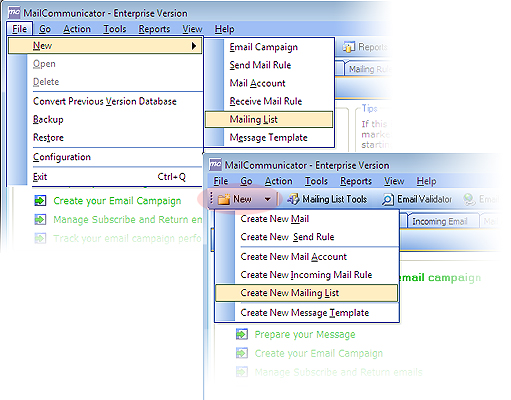
1. Go to "File/New/Mailing List"


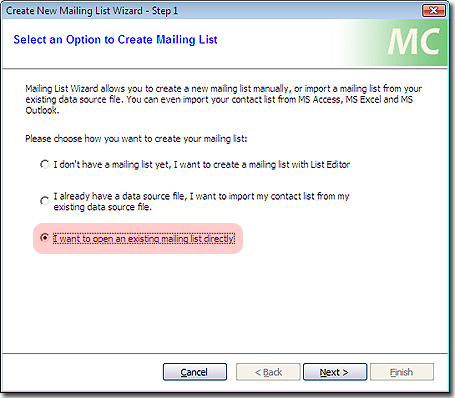
2. Select the "I want to open a mailing list Directly" and hit "Next"

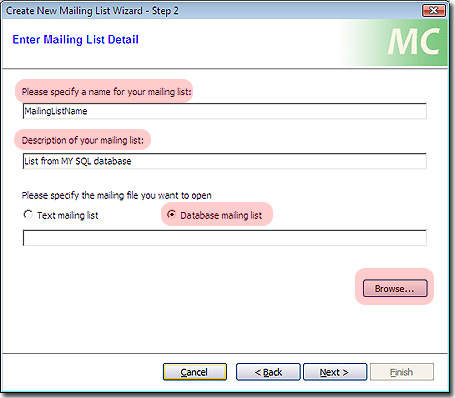
3. Give the list a name to be used in Mail Comm, Description. Make sure to select Database Mailing List and hit "Browse".


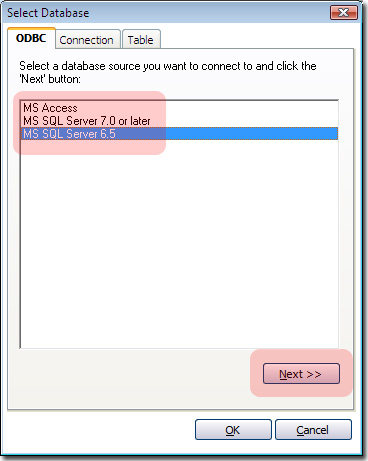
4. Select the Database type and click on "Next" to finish the steps and complete the wizard.


Sending Email FAQ

What happen if I send HTML message using Mail Communicator to someone that can only read text message?


What happen if I lost my internet connection and interrupted the emailing process?


How do I send email in scheduler mode?


Can I send attachment with Dynamic Mail Communicator?


Is it possible to instruct the program to throttle the sending of email like 1 email in every 2 seconds? I’m worried about getting into trouble with ISP if they all go out at one time.


Is it possible to send the emails directly from my database mailing list(such as Access, SQL server) since my mailing list are not in Text or CSV format?


I can not send more than 5 emails, why Mail communicator only sending 5 emails at a time?


How to set up a re-curring consecutive (time period ) newsletter campaign?


Can I send personalised attachments with my emails?


MORE FAQs